
AWS Org Logging: Centralization
AWS Org Logging: Centralization
I recently had to design and implement a centralized cloud infrastructure logging solution for a relatively large AWS organization with many teams operating their own infrastructure.
I split the problem in two. In this post I will discuss centralizing logs from CloudTrail, S3 and CloudWatch into one account. I will discuss log normalization in a future post.
Background
There are three types of AWS logs to consider:
- CloudTrail logs of AWS API activity
- Logs for AWS services that log to S3
- Logs for AWS services that log to CloudWatch
This table shows the destinations supported by some common AWS services:
| Logs | S3 | CloudWatch |
|---|---|---|
| VPC flow | ✅ | ✅ |
| Route53 resolver queries | ✅ | ✅ |
| Load Balancer access (all types) | ✅ | ❌ |
| CloudFront access | ✅ | ❌ |
| RDS query | ❌ | ✅ |
| EKS audit | ❌ | ✅ |
| API Gateway access | ❌ | ✅ |
| Elasticsearch | ❌ | ✅ |
Architecture Overview
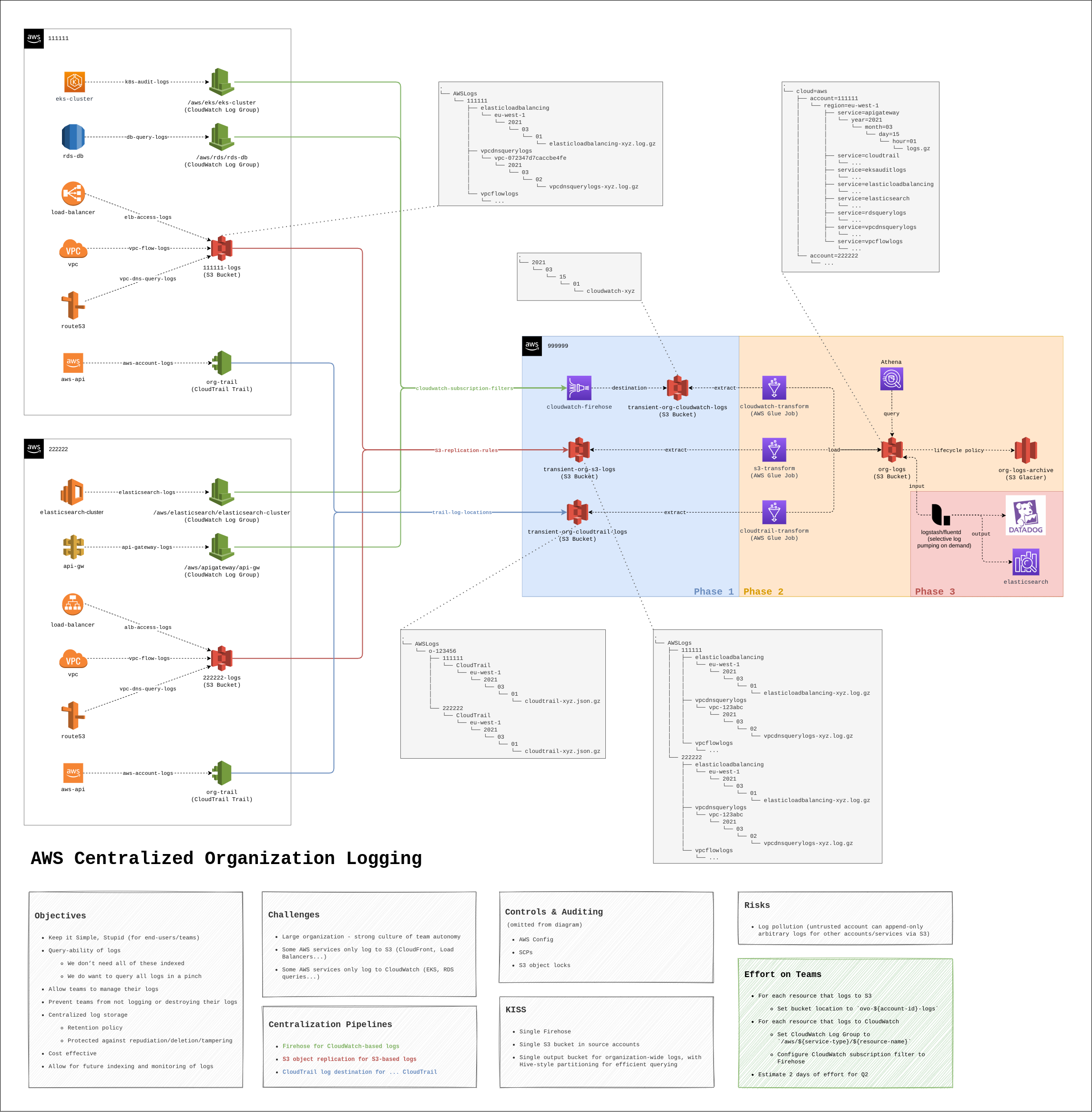
The diagram below provides an overview of the entire solution. You will note that we use three different pipelines for the centralization phase: one for each log type. Logs originate from source accounts across the organization and are stored in a destination account dedicated to log storage and retrieval.
In a nutshell:
- CloudTrail logging is configured at the organization level for all accounts in the organization. These logs are stored in a bucket in the logging account.
- S3-based logs are first stored in S3 buckets in source accounts and replicated to a single bucket in the logging account via S3 object replication.
- CloudWatch-based logs are first stored in CloudWatch Log Groups in source accounts and sent to a single Firehose destination in the logging account via a Subscription Filter. Firehose dumps these logs into another S3 bucket.
The pros of this solution are:
- Trivial for users to configure in source accounts.
- Single destination S3 bucket and Firehose keeps it simple, stupid.
- Users can still access logs in their source accounts.
- Less costly than ingesting everything in ELK or other stack.
- Scales transparently.
Some cons to consider:
- S3 and CloudWatch logs are duplicated in the organization, incurring costs. We can keep this to a minimum by configuring short retention periods in source accounts.
- The delay between logs being generated by AWS and processed by the centralization and normalization pipelines can be non-negligeable. This can be optimised by fine-tuning Firehose and Glue settings.
- S3 object replication presents a risk of log pollution that can’t be entirely prevented.
CloudTrail Organization Trail
We can set up an organization trail to log all CloudTrail logs across the organization to an arbitrary bucket by following this guide.
Organization trails can’t be disabled by accounts in our organization, however we will want to ensure we have a SCP that prevents accounts from leaving our organization. Perhaps surprisingly, by default a child account user with sufficient privileges can remove the account from an organization, rendering our other SCPs useless!
Centralizing S3-based Logs
S3 allows users to configure object replication for buckets. As the name indicates, this will replicate objects from one bucket into another bucket. We can use this to replicate objects from a single logging bucket in a source account to a destination bucket in the logging account.
By using a single destination bucket and taking advantage of the default object prefix used by most AWS services (AWSLogs\{account_id}\{service_logs}\...), our logs will be neatly organized by account ID in the destination bucket, without any additional work required. You can check the diagram in the Overview section to see this illustrated. For services that don’t use the default AWS prefix (e.g. CloudFront), the same object prefix should be manually configured when setting up logging for the service.
The following diagram illustrates the components of the S3 log replication pipeline:
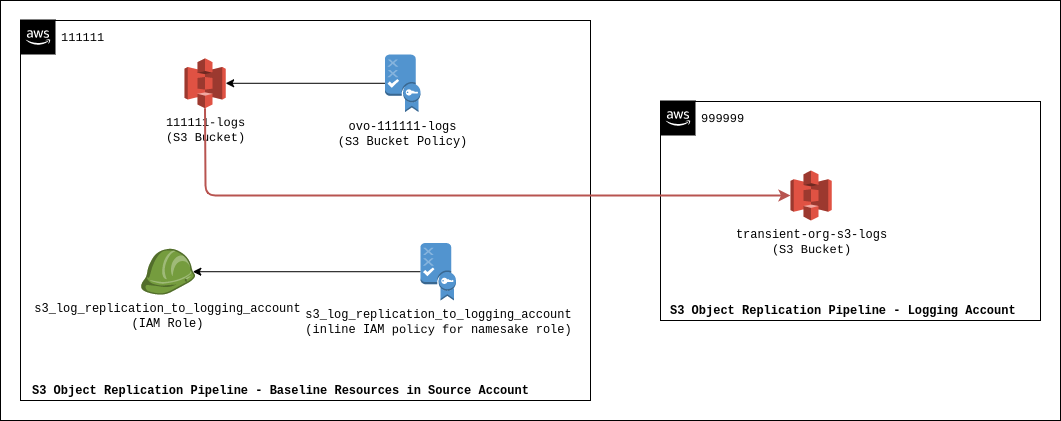
These resources should be managed by organization admins and SCPs should be used to protect resources in source accounts to ensure:
- The buckets and their objects can’t be deleted.
- Only AWS logging principals from relevant regions should be able to put objects in those buckets.
- Users should not be able to modify the bucket, in particular the bucket policy or the replication configuration.
The destination bucket policy should allow all accounts in the organization to s3:ReplicateObject to it. Note that unfortunately, AWS doesn’t have an IAM policy variable for account ID, meaning we can’t effectively scope the prefix for s3:ReplicationObject to ensure that accounts can’t write to each other’s prefix. This means that a malicious user in a source account can write (but not overwrite) to another account’s prefix (AWSLogs\{other_account_id}\...) by creating a new bucket and setting up an object replication configuration. A mitigation here is to detect the configuration of new object replication configurations in the organization.
Some other considerations here include ensuring that object replicas should be owned by the destination account and that replicas are not modified or deleted when the source object is modified or deleted.
Centralizing CloudWatch-based Logs
We can use Firehose to centralize logs from disparate CloudWatch Log Groups in the organization to a single bucket in the logging account. AWS has good documentation on setting this up.
In a nutshell, CloudWatch Log Groups allow us to set up a CloudWatch Subscription Filter that points to a CloudWatch Log Destination. In plain English:
In AWS, we can set up a subscription to forward our (CloudWatch) logs to a destination.
Here the CloudWatch Log Destination targets a Firehose in the logging account, and Firehose dumps its records into S3. Note that the CloudWatch Log Destination is in the logging account and is the same for the whole organisation.
A key consideration here is that we will want to enforce a strict naming convention for CloudWatch Log Groups in order to identify the source service that generated the logs when we later normalize logs. Services like RDS and EKS will enforce the same naming convention for the CloudWatch Log Groups by default, but for some other services (e.g. API Gateway) we will have to configure it manually:
/aws/{service_initialism}/{resource_id}/{resource_type}
Since Firehose logs the source account ID and the source CloudWatch Log Group name in the records, we can use these to identify the account and resource that generated the logs when we normalize them in the future.
Some other considerations here include ensuring that sensitive parameters are not logged (in particular for RDS, we should disable query parameters by enabling “terse” logging for DBs) and noting that CloudWatch Log Destinations are scoped by region. This means that if we operate in more than one region we will need a CloudWatch Log Destination in each region (but these can all point to the same Firehose in any region).
Closing Remarks
At this point we’ve centralized all our infrastructure logs in a single account, allowing us to tightly control access and retention. However the logs are currently not stored in a particularly useful way.
In a future blog post we will discuss normalizing the logs to improve queryability and shipping select logs to other services for further analysis.